
At a Glance
If your phone is stolen, especially on a trip, your first reaction is shock, but you can’t afford to stay there for long. What you do next is important: get somewhere safe, borrow a phone or computer, and lock your device with Apple’s Mark as Lost at iCloud.com/find or Google’s Find Hub and Remote Lock. Then call your carrier to suspend the line and protect your number, change your email and Apple or Google passwords from a trusted device, alert your bank, and file a police report for insurance. Before you travel, turn on Stolen Device Protection or Android Theft Protection, set a SIM PIN, and pack printed backup codes and key phone numbers separately from your phone.
When I was in Paris for an October family vacation, I was very aware of where my phone was at all times. Even so, I casually kept it in my back jeans pocket from time to time. I know phone theft is something of an epidemic, but honestly, beyond keeping it safe on my person, I hadn’t thought much about what to do if it was ever stolen.
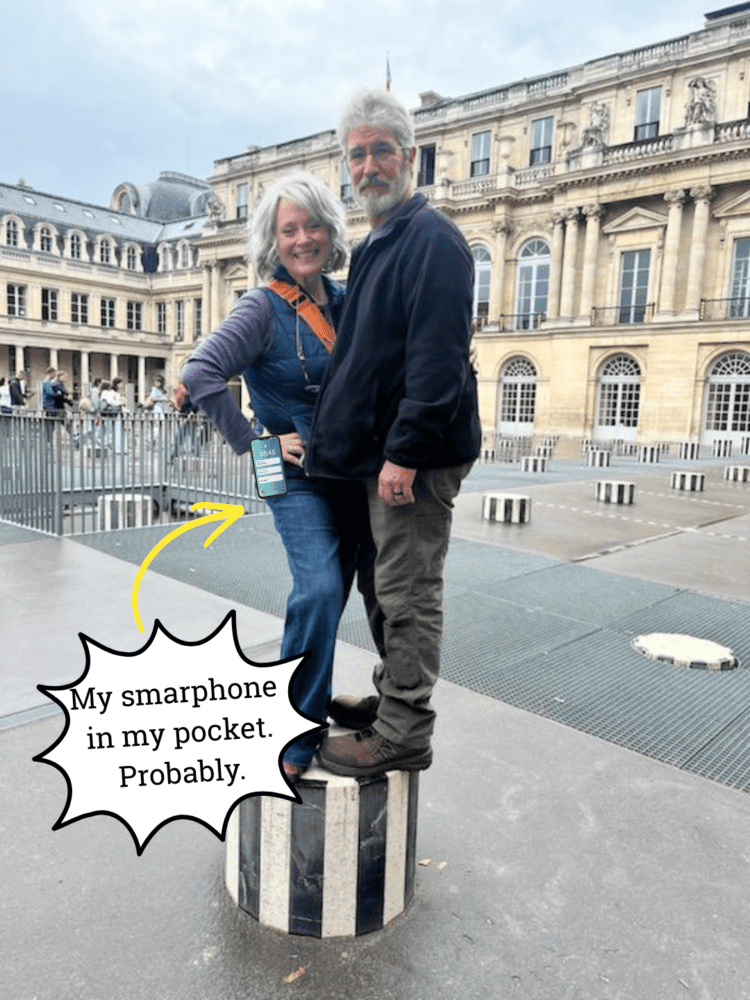
Then I saw a post on Reddit from a woman whose iPhone was stolen in Paris. It was her only device, so she couldn’t get into Gmail or iCloud, because the two-factor codes went to the phone that was gone. “Find My” showed it offline. She was able to borrow a friend’s phone, but the only thing she thought to do was call her bank to make sure nothing fraudelent had happened. Her question was the same as mine: What else do I need to do if this happens to me?
So I dug around in the offiial websites of Apple, Google, and even the best advice from police to come up with a plan if it ever happens to you (or me!).
Some of the links in this post may contain affiliate links for your convenience. As an Amazon Associate, I may earn a small commission from qualifying purchases without any increase in price to you.
How Common Is Phone Theft, Really?
London is the city travelers hear about most. Tourists and residents alike tell stories on social media about having their phone ripped out of their hand by a passing bicyclist or someone on a scooter. The Metropolitan Police recorded more than 80,000 phone thefts and robberies in 2024, but more recently, these numbers have fallen due to a concerted effort by police. In the U.S., police rarely count phone thefts separately, but surveys estimate that in 2024, about 7.3 millions phones were lost or stolen.
The First Hour: What to Do Right Away
Having your smartphone stolen directly out of your hands or realizing it’s been taken from a purse, pocket, or backpack is quite a shock. You reach for it, it’s always in its usual place, but now it’s gone. At that moment, it’s important to take quick action to make sure your information is secure, even if you never get the phone back.
Work through these in order.
1. Get to a Safe Place and Borrow a Device
Don’t chase the thief. Borrow a friend’s phone or laptop, or step into a shop, hotel lobby, or café and see if you can borrow one there. With your Apple phone, use the “Find My” feature, but Apple’s advice is to let local law enforcement handle it rather than trying to get it back yourself. If you have an Android, use its “Find Hub”.
2. Lock the Phone Remotely
iPhone: Mark as Lost
Go to iCloud.com/find and sign in. Apple notes that you don’t need a verification code to sign in there, so this works even when your stolen iPhone is the device that normally gets your codes. Select your iPhone and choose Mark as Lost.
Lost Mode locks the phone with your passcode and suspends Apple Pay cards. If the phone is off or offline, it locks the moment it reconnects. iPhone 11 and later models with the “Find My” network turned on can sometimes still be located for up to 24 hours after being turned off, but many stolen phones are kept powered off or broken up for parts, so they may never show up again. Lock it anyway.
Two important tips from Apple: if the phone was stolen (not just misplaced), don’t add your contact info to the lock screen, since thieves use it to target you with scams. And never remove the phone from “Find My“, because that removes Activation Lock and makes it easier to resell. Don’t bother calling Apple Support or walking into an Apple Store. Apple can’t track your phone or unlock it for you, so “Find My” is the tool to use.
Android: Remote Lock and Find Hub
Google’s Find My Device is now called “Find Hub”. Go to google.com/android/find on any browser to see your phone, play a sound, or choose Mark as lost. If you can’t sign in because your 2-Step Verification codes go to the stolen phone, go to android.com/lock. If you turned on Remote Lock beforehand, you can lock the screen with just your phone number and a quick security check.
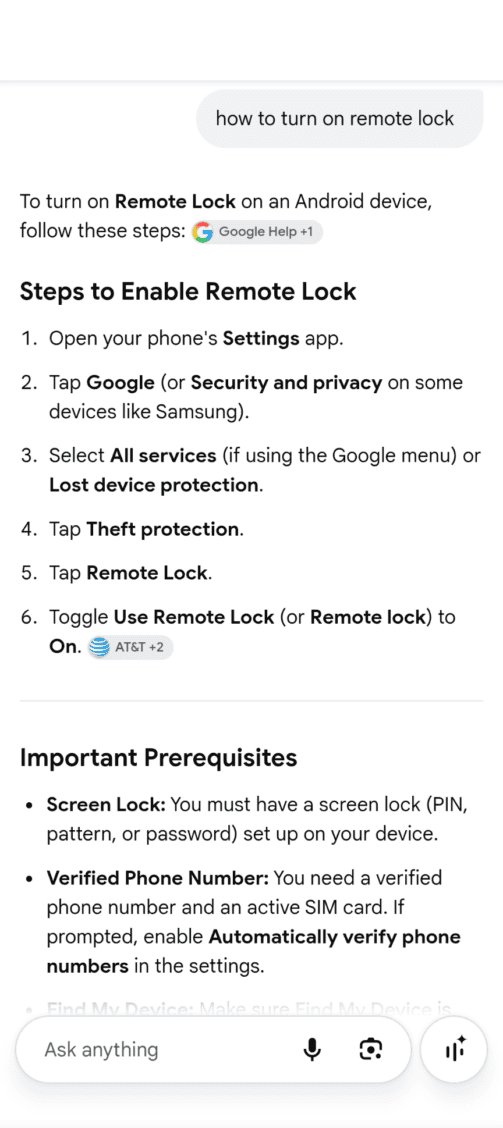
3. Call Your Carrier
Once you’ve locked down your phone, get in touch with your carrier and report the phone stolen. Make sure they suspend the line because according to the FCC, you may be responsible for charges made before you report it. Ask for written confirmation so you have hard evidence of the date and time you reported it stolen. Once you report it stolen, T-Mobile (and most other carriers) adds that number to an international blacklist, so the phone won’t work on most networks even if the thief pops in a new SIM card.
While you’re on the phone, turn on SIM-change and port-out protection so no one can move your number to their own SIM and intercept your codes. Under FCC rules, carriers must notify you of SIM changes and port-out requests and offer free account locks.
If you have Verizon, you’ll notice this referred to as SIM Protection and Number Lock. AT&T calls it Wireless Account Lock. Ask how to get your number onto a new SIM or eSIM, because your number is often the key to getting back into your accounts. Suspending the line also stops a thief from running up calls, texts, and roaming charges in your name.
4. Change Key Passwords From a Trusted Device
Start with your email, because it’s the master key to resetting everything else. Then do your Apple Account or Google Account, banking apps, and any password manager. On iPhone, review Sign-In & Security and remove any devices or phone numbers you don’t recognize.
I’ve read advice to deliberately type wrong passwords so your accounts lock themselves, and it sounds like a clever fix, but please don’t do this. When I checked with Apple, they say that too many wrong attempts can lock your Apple Account until you reset your password, and without your phone that can push you into account recovery, which can take days to resolve. Changing your passwords and signing out unfamiliar devices protects you without locking you out.
5. Check In With Your Bank (If Any of These Apply)
Here’s some good news: you don’t need to call every bank you use. If your phone was locked and you marked it as lost, a thief usually can’t get into your banking apps. Give your bank or card company a quick call only if one of these fits your situation:
- Someone may have seen your passcode, or the phone was stolen while unlocked. This one is urgent. Ask them to watch for fraud, and change your banking passwords from a trusted device.
- Your cards are in Apple Pay or Google Wallet. Ask them to remove the stolen phone from your card. (The FCC also suggests changing passwords for mobile payment apps and any bank or card accounts you used on the phone.)
- Your bank texts sign-in codes to your phone number. Ask them to flag your account until your number is back up and running on a new SIM.
That’s it. There’s no need to close your accounts or cancel your cards.
By the way, to help me remember which cards are in my Google Wallet, I opened it and took a screenshot to save in a file.
6. File a Police Report
Don’t expect an investigator to track down your phone, but you’ll likely need it for insurance. Have your phone’s make, model, serial number, and IMEI ready. Apple explains that you can find your serial number even without the device. Ask local police for a written report or case number.
When you know for sure the phone isn’t coming back, erase it remotely (more on that tradeoff in the FAQ below).
Want More Useful Info From Survival Mom?
If Your Phone Was Your Only Device
Apple: According to Apple, if you’ll have access to your trusted phone number soon, it’s faster to wait than to start account recovery. So get your number working on a new phone or SIM first. Then sign in on the new iPhone and Apple can text your code.
A recovery contact (a trusted friend or family member with an Apple device) can also give you a code. If none of that works, you can request account recovery at iforgot.apple.com or through the Apple Support app on a borrowed device, but it can take several days or longer, and Apple Support can’t shorten the wait.
Google: On the sign-in screen, choose “Try another way” and enter one of your 8-digit backup codes. Google suggests printing them and keeping them with your passport or other important documents. Your recovery phone number or recovery email also work, which is another reason to get your number back from your carrier quickly.
What Thieves Do With Stolen Phones
Most thieves want the phone itself, not access to your photos or downloaded docs. In a Met press release, London’s mayor explains how a £50 million-a-year trade in stolen phones operated in London. It’s organized crime, with middlemen who unlock devices or break them up for parts and gangs that smuggle them overseas. An unlocked phone is worth more than a locked one, so your Activation Lock matters.
The bigger danger is your accounts. The Wall Street Journal reported on thieves who watch victims type their passcode, then grab the phone, change the Apple Account password, turn off Find My, and drain bank accounts. Apple’s Stolen Device Protection was created to stop this.
Watch Out for “Apple Found Your iPhone” Texts
After a theft, expect to get phishing text messages. Thieves will send texts or emails pretending to be Apple, saying your phone was found and linking to a fake Find My page to steal your password.
This is a very sophisticated system. Malwarebytes says these messages can include your phone’s exact model and color and might even arrive months later. They messages will look official and professional, but Apple says clearly that it will never contact you to say your device has been found. Never share your passcode, password, or a verification code with anyone who contacts you.
Readers on Reddit shared other versions of this type of scam — sweet, pleading texts from someone who “found” your phone, threatening ones demanding you unlock it, or a message claiming they bought it overseas and need your Apple Account password.
Whatever the story, don’t be persuaded, don’t respond to these types of texts or emails, and never take the phone out of Lost Mode, remove it from Find My or your Apple Account. And, of course, never share your password. Each of those removes the protections that make a locked phone nearly worthless to a thief.
iPhone vs. Android Quick Reference
| Feature | iPhone | Android |
|---|---|---|
| Locate and lock from any browser | iCloud.com/find (no code needed) | google.com/android/find (Find Hub) |
| Lock without signing in | Not needed; iCloud.com/find skips the code | android.com/lock with your phone number (Remote Lock must be on) |
| Stops a thief who knows your passcode | Stolen Device Protection | Identity Check (on supported phones) |
| Auto-locks if snatched | No direct equivalent (use Stolen Device Protection) | Theft Detection Lock |
| Anti-resale lock | Activation Lock | Factory reset protection with your Google Account |
| Backup sign-in option | Recovery contact or recovery key | Printed backup codes |
| Where to turn it on | Settings > Face ID & Passcode | Settings > Google > All services > Theft protection |
Do This Now, Before Your Phone Is Stolen
- Turn on Stolen Device Protection (iPhone). When you’re away from home or work, it asks for Face ID or Touch ID before anyone can open your saved passwords, and it makes a thief wait an hour before changing your Apple Account password.
- Turn on Android Theft Protection. Theft Detection Lock, Offline Device Lock, Remote Lock, and Identity Check are all under Settings > Google > All services > Theft protection.
- Use a stronger passcode. A longer alphanumeric code is harder for someone to watch you type. Use a phrase that’s easy to remember, along with a number and a symbol. Cover the screen when you enter it in public.
- Set a SIM PIN. According to Google, this keeps a thief from using your SIM in another phone. iPhone has the same option under Settings > Cellular.
- Lock your number with your carrier. Turn on SIM-change and port-out protection.
- Set up account recovery. Add an Apple recovery contact, print your Google backup codes, and store them away from your phone. Use my printable Stolen Phone Action Card for this.
- Know your coverage. Check AppleCare+, carrier insurance, travel insurance, and card benefits. American Express, for example, requires that you pay your phone bill with the card and may ask for a police report filed within 48 hours.
- Keep your phone on your body, not your back pocket. Use something like this crossbody phone lanyard. I often use the orange Baggalini cross-body bag you see here, and I move it in front of me whenever we’re in busy or crowded areas. They don’t make this model anymore, but this one is similar as well as many other brands.

When You Travel
- Carry your Stolen Phone Action Card, and make two copies. Fill in your carrier’s international support number, bank fraud lines, and your phone’s IMEI and serial number. Keep one copy on you, in a different pocket or pouch than your phone, and leave the other at home or in your hotel room.
- Don’t keep travel documents only on your phone. Save copies of boarding passes, reservations, and key contacts in cloud storage you can open from any device. I have a Gmail folder for each trip, and that’s where I save things like digital entry tickets to museums, hotel confirmations, and so on.
- Bring a backup device. If you’re traveling alone, a tablet, laptop, or inexpensive spare phone signed in to your accounts makes the whole process a lot easier.
- Keep the phone on you, and out of your back pocket. I’m guilty of the back-pocket habit myself, but a front pocket, phone leash, or zipped crossbody bag is much safer. Check out bags like this one with anti-theft features. Don’t count on a backpack, either. Readers on Reddit shared stories of phones stolen from the bottom of a zipped backpack on a packed Paris Metro train without the owner noticing a thing until it was too late.
- Watch where you use it. Avoid scrolling at the curb, on crowded platforms, or at café tables by the sidewalk, where a thief can grab it and be gone in seconds. A little situational awareness goes a long way.
For more trip prep, see my guides to staying safe in an emergency in another country, packing a travel medical kit, and the emergency apps I use most often.
Get Your Free Stolen Phone Action Card
Print this free wallet card, fill it in before your next trip, and keep one copy on you and one at home. If the worst happens, you’ll know exactly what to do, in order, without having to search for it.
Protecting Your Kids’ and Teens’ Phones
Set up the same protections on your kids’ phones, and check that their devices show up in Family Sharing or Google Family Link. When you travel, pick a spot to meet in case anyone gets separated without a phone. We did this when we were in the Louvre, and I’m glad we did because phone reception there was terrible, making it all but impossible to text each other.
A family emergency communication plan works just as well on vacation as it does at home, so if you don’t have one yet, this is a great time to make one.
FAQ
Not easily, if you act fast. With “Find My” on, Activation Lock keeps a thief from erasing and setting up your iPhone without your Apple Account password. That is why thieves try to watch you type your passcode, or send fake Apple texts afterward. Mark the phone as lost right away and never share your passcode or codes.
Usually not in the first few minutes. Mark as Lost or Remote Lock locks the phone and suspends Apple Pay or Google Wallet while you can still see where it is. Erasing cannot be undone, and a factory-reset Android phone disappears from Find Hub. Once you are sure the phone is gone, it’s safe to erase it, but do not remove an iPhone from “Find My”, because that removes Activation Lock.
You can lock an iPhone at iCloud.com/find without a verification code. To regain your accounts, get your phone number working on a new phone or SIM so codes reach you, ask your Apple recovery contact for a code, or use a printed Google backup code. Formal account recovery works too, but can take several days.
It depends on your policy. AppleCare+ with Theft and Loss, carrier insurance, travel insurance, and some credit cards may cover theft, each with its own deductibles and limits. Many card benefits require that you paid your phone bill with that card and filed a police report within a short window, such as 48 hours. Check before you leave.
Yes. Police rarely recover the phone, but insurers and card companies often require a report, and it helps if you dispute fraudulent charges. Have your phone’s make, model, serial number, and IMEI handy.
Related Content
- Stuck at the Airport? Your Step-by-Step Survival Plan for Delayed Flights
- Create a Family Emergency Communication Plan
- How to Survive a War or Crisis Abroad: Emergency Preparedness for Travelers in a Foreign Country
- Essential Tips to Keep Safe at Crowded Events
- Pack a Handy Travel Medical Kit & Stay Healthy While Traveling
- Top Frugal & Practical Tips for Your Next Family Vacation
The Final Word
If your phone is ever lost or stolen, you realize in a moment just how much you depend on that little device! When that happens, just a few steps can help ensure the loss is limited to only the phone and not any personal or financial information that could complicate your life even more. Now that you know what to do, don’t procrastinate! It’s quick and easy to take care of most of these preventive steps before something happens.
Great advice, thank you!