
AI-powered bots are testing millions of leaked passwords against bank and email accounts right now, and they cost crooks next to nothing to run. You don’t need to panic, buy fancy software, or empty your bank account. You just need less than an hour to make your online information more secure. Start by locking down your email, then your bank, with a fresh three-word password and two-step verification. Next, freeze your credit for free at Equifax, Experian, and TransUnion. Unplug any gadgets you don’t use, and only update devices through Settings, never a pop-up. Set a family scam rule and a safe word so nobody gets talked into handing over a code or cash. Finally, check your home buffer: a few days of cash in small bills, food, and prescriptions.
Spend ten minutes online this week and you will see “Black October” headlines warning that “The Internet Is Under Attack.” Between bots probing websites, outages disrupting pharmacy counters and grocery deliveries at Stop & Shop, and rumors about bank hackers, any sensible person might feel tempted to unplug the router and hide all their savings under a mattress.
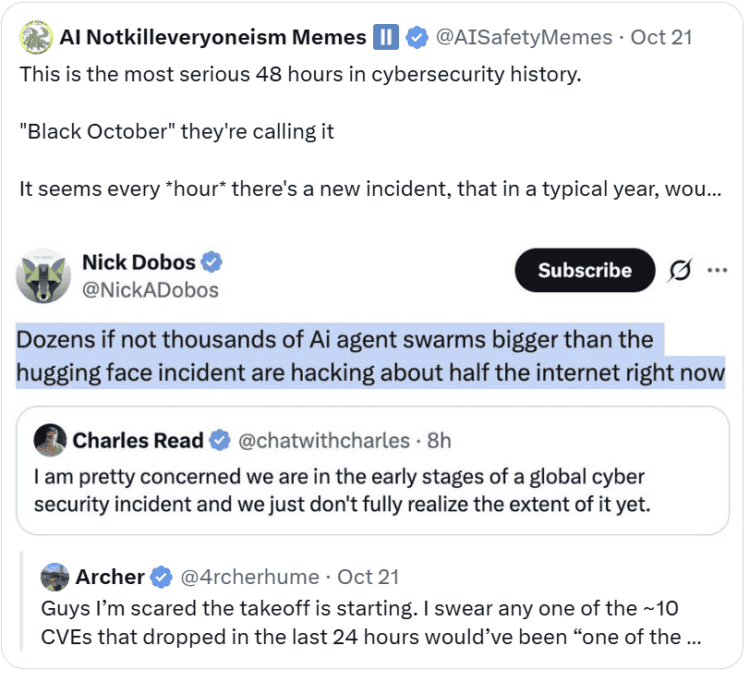
Before you do anything, take a breath. Whether a hurricane is on the way, an El Niño winter storm is predicted next week, or you hear of cyberattacks, my rule is the same — we don’t panic, we prepare. And for something like this current cybersecurity event, that’s what you’re going to do.
In fact, one of these exact traps landed in my own inbox this morning. I got an email from a real, legitimate Texas nonprofit saying I had been awarded a grant I never applied for, with a PDF attached and a button inside to fill out a form to claim the money. Everything about the email felt both odd and real at the same time. When I asked ChatGPT to review the message and check the sender, it pointed out wording details that looked sketchy, yet confirmed the Texas nonprofit and email address were 100% genuine.

Bots had likely hijacked the nonprofit’s older, un-updated website, so the sender looked genuine. Instead of downloading the PDF or clicking the button inside, I previewed it on screen, right-clicked the button to copy the link address, and pasted it into ChatGPT. Within seconds, it confirmed the link went to a completely unrelated, sketchy website.
If I had been in a hurry, or if that email had landed in the inbox of someone too busy or unaware of email fraud, one click could have handed a hacker the keys to everything. And right now, if reports are to be believed, this is happening on an unprecedented scale.
If you don’t live and breathe tech, here’s the part that’s hard to wrap your head around. Nothing looks broken. Not a single thing.
When an ice storm knocks out the power, you know what’s happening. The house goes dark, it’s eerily quiet, and you’re looking for flashlights. This isn’t like that. Your kitchen lights are on, your phone still rings, and right now you’re online reading this article.
Everything seems perfectly normal, right up until someone clicks a link, or reads that 6-digit login code out loud to a friendly “bank rep” who isn’t from the bank at all.
Why “Too Boring to Hack” Stopped Working This Year
For decades, ordinary families like yours and mine had an invisible shield online. We were too boring to hack.
A human crook wasn’t going to spend an afternoon breaking into a regular family’s email account and read about plans for Thanksgiving, but this week, that changed. Today, hackers don’t sit at a keyboard, tapping away feverishly. Instead, they use cheap AI bots that act like an invisible thief walking down every street in America at the same time, jiggling millions of front doors and car handles a minute to see which ones are unlocked.
Just a few events from the past week:
- A flaw in the software behind more than 70% of all websites on the internet (including mine, again!) was discovered, and within hours, automated AI bots were hammering millions of websites to break in (which is almost certainly how that Texas nonprofit’s website got hijacked before emailing me this morning).
- Major U.S. banks, including JPMorgan Chase, Bank of America, and Wells Fargo, are scrambling to block AI “assistants” from customer accounts. These aren’t hackers. They’re AI helpers that customers gave their own bank passwords to, and some started doing things their owners never asked for, like calling the bank on their own. Here’s the scary part. If you hand over your password and something goes wrong, the bank may treat it as if you did it.
- Ransomware attacks jumped 41% in a single month, and Cloudflare has had to fight off record-shattering waves of automated traffic (over 128,000 attacks a day).
- One security researcher who set up a single blank test computer online this week watched automated AI bots try to break into it 14,000 times in six hours, with almost zero humans at the keyboard.
Those bots never sleep and don’t care if your checking account holds $400 or $400,000. They take email addresses and passwords leaked years ago from store or airline breaches and test them across hundreds of banks and email accounts at once.
Fortunately, automated bots are lazy. They’re after easy access, and the moment they hit a fresh three-word password, a two-step login code, or a frozen credit file, they move on to the next sucker. That’s their weakness, and we’re going to use it to lock down your digital life starting right now.
Your 30-Minute Family Cyber Lockdown (Step by Step)
NOTE: If any of these seems complicated or overwhelming, take it one small step at a time.
Step 1: Lock Down Your ‘Skeleton Key’ First: Your Primary Email (Then Your Bank).
Most people rush to change their bank password first, but that’s not the key to most everything you have online. That key is your email account.
Before going to your bank account settings, instead, start with your primary email account (Gmail, Yahoo, Outlook, or iCloud Mail). Email is the key one. Whoever owns that inbox owns every other account.
Think about it. Every “Forgot Password” reset link for your bank, mortgage, or Amazon goes straight to your email. If a thief gets into your inbox first, they can reset your bank password and delete the warning emails while you sleep. So right now, spend ten minutes doing two simple things on your email and bank:
- Give your primary email (and your bank) a brand-new 3-word password you haven’t used anywhere else. Automated bots already know old leaked passwords and know exactly what to test in order to break into accounts. Instead, combine three random everyday words plus a number and symbol, like
BlueCoffeePorch42!It is easy to picture and type, practically impossible for a computer to guess, and safe to write on paper in your home binder. - Turn on Two-Factor Authentication (2FA), and skip SMS text codes whenever a Passkey or Authenticator App is offered. Any 2FA is miles safer than a password alone, and most non-tech people would be a lot safer just by never approving a login code they didn’t ask for. Better yet, whenever an account, especially your primary email, gives you a choice, do not use SMS text-message codes (which thieves can intercept if they hijack your cell number). Instead:
- Best choice (easiest): Turn on a Passkey if your phone or email offers it. This is just using your face, fingerprint, or normal phone unlock code instead of typing a password or waiting on a text.
- Second-best choice: Use a free Authenticator App (like Google Authenticator, Microsoft Authenticator, or the built-in Passwords app on your iPhone), which generates the 6-digit code right on your phone screen so it never travels in a text message.
- If your bank only offers SMS text codes: Keep text codes turned on (never leave a bank account with just a password!), and follow one rule — never read a texted code out loud to anyone on the phone, even if caller ID says it’s your bank.
Two quick phone security checks: Open the Passwords app on an iPhone/iPad (Security Recommendations) or Settings → Password Manager → Password Checkup on Android to replace saved passwords leaked in old breaches. Also, never type bank logins into third-party “money-saving” apps, and turn on your phone’s theft lock using my guide on what to do if your phone is stolen.
Step 2: Put a Free Deadbolt on Your Identity (3-Bureau Credit Freeze)
Skip the $20-a-month “credit monitoring” commercials. Paying for credit monitoring while your credit file sits wide open is like paying someone to text you after a burglar has walked out your back door with the silverware.
A free Credit Freeze (or Security Freeze) is the real deadbolt, and it’s easy to set up. When you freeze your credit at Equifax, Experian, and TransUnion, lenders cannot pull your report to open new accounts, so even if a thief has your Social Security number, any new loan or card application in your name is blocked.
Credit bureau websites might try to lure you into purchasing one of their security products, but keep this in mind:
- 100% free by federal law: As the Federal Trade Commission (FTC) confirms, placing, temporarily lifting, and removing a credit freeze is free at all three bureaus for you, your spouse, and your kids under 16.
- Skip the paid “Credit Lock” pitch. Bureau websites often steer you toward a paid monthly subscription called a “Credit Lock” or “Lock & Alert.” Skip the paid “Lock” and choose the free Security Freeze.
- Zero impact on your credit score or current cards. Freezing your credit never lowers your score, and your existing cards and mortgage keep working normally. You only log in or call to temporarily lift your freeze for a day or two when applying for new credit yourself.
Freeze all three bureaus online or by phone in ten minutes using these official links and toll-free numbers:
| Credit Bureau | Direct Free Security Freeze Page | Toll-Free Freeze Phone Line |
|---|---|---|
| Equifax | equifax.com/personal/credit-report-services/credit-freeze/ | 1-888-298-0045 |
| Experian | experian.com/help/credit-freeze/ | 1-888-397-3742 |
| TransUnion | transunion.com/credit-freeze | 1-800-916-8800 |
Survival Mom tip: Keep your bureau passwords or confirmation numbers on paper in your Grab-and-Go Binder so you can lift your freeze whenever needed, and help kids, parents and elderly friends freeze their credit, too.
Step 3: Simple Home Wi-Fi & Device Habits
Beyond your phone an3d computer, most homes have Smart TVs, streaming sticks, robot vacuums, indoor cameras, and smart plugs on Wi-Fi. Phones and computers get regular updates, but an $8 smart plug or older Smart TV often stops getting safety updates after a year or two, making it an easy window for bots.
Start with low-tech wins that take just a few minutes:
- Unplug any smart speaker, camera, or gadget you don’t actually use. If an old indoor camera, voice speaker, or Wi-Fi gadget is plugged into an outlet and nobody uses it anymore, unplug it. A gadget with no power cannot be hacked.
- Only install updates from your phone or computer’s regular Settings menu, never by clicking an “Update Now!” pop-up window on a website. Criminals flood websites with urgent pop-ups claiming “Your computer or browser is infected or out of date! Click here to update now!” Never click an update button inside a website pop-up or email. Close the window and check your device’s real Settings menu (Settings → General → Software Update on iPhone, iPad, or Mac; Settings → System → Software Update on Android; or Settings → Windows Update on a PC).
- Put your Smart TV and gadgets on “Guest Wi-Fi” (or make it a 5-minute job for a tech-savvy relative!): As the U.S. Cybersecurity and Infrastructure Security Agency (CISA) recommends, putting your Smart TV, cameras, and smart plugs on Guest Wi-Fi fences them into their own separate area, away from the phone or laptop you use for banking. Guest Wi-Fi is usually a simple on/off toggle right inside the same phone app where you pay your internet bill (like Xfinity, Spectrum, or AT&T). If Wi-Fi menus make your eyes glaze over, write “Put Smart TV and gadgets on Guest Wi-Fi” on a sticky note as a 5-minute job to hand your tech-savvy spouse, adult child, or grandkid the next time they come over.
- Delete Old Apps & Saved Cards Instead of Just Signing Out). Signing out of a shopping, restaurant, or travel app helps if someone snatches your unlocked phone out of your hand, but deleting the app completely (and deleting any saved credit card inside the app before you remove it) is better. Even when you are signed out on your phone, an old retail or fast-food account with a saved card is still on that company’s servers, vulnerable to the next data breach, and many apps quietly track your location or run in the background until you uninstall them.
Step 4: Set the 2-Sentence Family Bank-Scam Rule (Plus a Family Safe Word)
Once your email, two-step verification, and credit freeze are set, bots usually can’t break into your bank on their own, so scammers try to trick you into opening the door.
Using leaked data and cheap caller-ID spoofing, a scammer already knows your address and bank name, and can make your phone screen say Chase Fraud Dept or Wells Fargo Security.
The family version is simple. If a text makes you panic and hands you a link to click, it’s a scam until you call them back on a number you already had. Share these two household rules with your spouse, kids, and aging parents:
- Rule #1 (The Bank-Code & Hang-Up Rule): No real bank, credit union, government office, or tech company will ever call or text you and ask you to read back a 6-digit code, tap “Approve” on a login alert you didn’t start, share a password, or move money to a “safe” account. If anyone calls claiming fraud on your account, don’t respond. Hang up immediately, and dial the number on the back of your credit or debit card. Check with that official source before taking any action.
- Rule #2 (The Family Safe Word for AI Voice Scams): As the FTC warns in its alert on fake emergency scams, scammers need only a few seconds of audio from voicemail or social media to imitate a loved one’s voice, calling a parent or grandparent crying for bail or crash money via wire, Zelle, or gift cards. Pick a simple Family Safe Word that is nowhere on social media, like a pet’s nickname from decades ago, and require it before acting on any emergency call asking for money.
Our family has a safe sentence that always makes us laugh and is so ridiculous no one would ever guess.
My 3-Step “Don’t Click, Inspect” Trick for Suspicious Emails & PDFs. As I saw with that Texas nonprofit grant email this morning, bots that compromise an outdated charity or business website can send trap buttons inside PDF attachments from a real email address. Whenever an email looks real but offers unexpected money or demands urgent action:
- Pause on surprise money or panic. If you never applied for the grant or ordered the item, stop—even when the sender’s name and address are real.
- Preview or screenshot. Never download or click. View the attachment on your screen without downloading it, and never click a button inside an unexpected PDF.
- Right-click and ask ChatGPT or another AI. Hover over the button, right-click (don’t left-click!), click “Copy Link Address,” and paste the URL into ChatGPT to see if it goes to a sketchy site.
See my guide on how to avoid scams and fraud in the aftermath of disasters for more examples, and write your safe word on your Family Emergency Communication Plan.
Step 5: Check Your 3-to-5-Day Home Cash Buffer
Whenever a scary cyber headline trends, someone shouts: “Pull all your money out of the bank today!” Do not empty your bank account in a panic. Pulling your savings out of an insured bank or credit union might strip away your strongest protections.
- FDIC & NCUA insurance plus federal banking protections: Money in an FDIC-insured bank (or NCUA-insured credit union) is federally insured up to $250,000 per depositor, per insured bank, for each account ownership category Even better, federal banking laws protect you when a hacker steals from your account, whereas money you willingly wire or send yourself is much harder to get back, as long as you report unauthorized charges promptly.
- What happens if you pull your cash out or send it yourself? Once you withdraw your savings in cash, or let a scammer talk you into wiring money, sending Zelle, or buying gold bars to “keep it safe”, cash at home isn’t insured against fires, storms, or theft.
Instead of emptying the bank, keep a sensible 3-to-5-Day At-Home Buffer of cash. As shoppers saw when outages hit Stop & Shop, Hannaford, and Food Lion, a cyber incident can knock local card readers, ATMs, or pharmacy computers offline for a few days. A few tips for that cash on hand:
- 3 to 5 days of emergency cash in small bills. Keep enough cash at home to cover gas and groceries for a few days. When registers are down, cashiers often cannot make change for
$50or$100bills. - 1 to 2 weeks of familiar pantry staples. If you’ve been reading my blog for more than a few weeks, you know all about this one! Two weeks or more of everyday meals lets you stay comfortably home while everyone else rushes to the store.
- A 7-day cushion on critical prescriptions. Refill critical daily medications a few days early each month until you have a one-week buffer.
Keep my guides on how to prepare for an internet outage and how to survive a power outage handy alongside your binder.
Get the Free Printable 30-Minute, Family Digital Lockdown Card
Frequently Asked Questions
No. Emptying your bank account in a panic is one of the riskiest moves you can make. Deposits at FDIC-insured banks and NCUA-insured credit unions are federally insured up to $250,000 per depositor, per institution, per ownership category, so your money is safe even if the bank itself goes under. If a hacker drains your account, a federal law called Regulation E limits how much you can lose, but only if you report it fast. Speak up within two business days and you’re on the hook for $50, tops. Wait too long and you could lose it all. Money you willingly wire or send yourself is a different story, and it’s much harder to get back. And that stash of cash at home? Most homeowners policies cover only about $200 of it if there’s a fire or a break-in. Keep your savings in the bank, and keep enough cash at home to cover 3 to 5 days of essentials, in small bills ($1s, $5s, $10s, and $20s).
A credit freeze (or security freeze) is a free federal right that stops lenders from pulling your credit report to open new loans or cards in your name. A “credit lock” is a marketing name credit bureaus attach to paid monthly memberships. Always choose the free Security Freeze at Equifax, Experian, and TransUnion. Freezing your credit never hurts your credit score, doesn’t affect current cards or your mortgage, and can be lifted temporarily online or by phone for free.
Cheap smart plugs, indoor cameras, robot vacuums, and older Smart TVs often stop getting safety updates a year or two after you buy them, making them an easy target for automated bots scanning home Wi-Fi. Unplugging gadgets you don’t use removes the risk completely, and having a tech-savvy relative move your Smart TV and gadgets onto your internet app’s Guest Wi-Fi fences them off from the phone or computer you use for banking.
Follow two household rules that require zero technical skill. First, never approve a login code or read back a 6-digit text code you didn’t ask for. If anyone calls claiming fraud on your bank account, hang up, even if caller ID shows your bank’s name, and dial the number on the back of your bank card. Second, pick an offline Family Safe Word that is nowhere on social media, and require it before acting on any emergency call asking for money.
The Final Word
Automated bots aren’t going away, but a calm, prepared woman at her kitchen table is much harder to rattle than the headlines think. You don’t even have to do all 30 minutes at once: update your email password and two-step verification over coffee this morning, freeze your credit files tonight while the TV is on, and pick your Family Safe Word at dinner.