


This article shows how to use AI chatbots like ChatGPT and Claude for emergency preparedness, with ready-to-use prompts for building an emergency kit and planning for specific scenarios like power outages or severe weather. It includes ground rules for prompting effectively, protecting privacy, and verifying safety-related answers, based on the author’s own experience using AI for prepping.
I’ve always been the first one in my circle to try out new technology, a new recipe, even a new flavor of ice cream. So I was using AI well before most people around me were familiar with the term. It didn’t take long to figure out the most useful way to do it — treating it like a super-smart friend who never gets tired of my questions. And, after using it for nearly three years now in different ways, it’s turned into one of the most useful pieces of technology I use on an everyday basis — including prepping.

This isn’t an article about letting AI take over your thinking, giving it too much private information, or being so fearful that you don’t use it at all. I want to show you how to use it as a research assistant, a planning partner, something to help with brainstorming ideas, and sometimes a second pair of eyes on a problem you’ve been dealing with for weeks.
A quick note before you dive in. AI tools (ChatGPT, Claude, and others) are excellent at organizing information, generating options, and helping you plan. They are not a substitute for hands-on practice or your own judgment about your family’s situation. With every answer AI gives you, apply commonsense, ask that same question to another AI and compare answers, and whenever something is high-stakes, like a financial or health decision, consult a human expert for their advice as well.
My First AI Experiments
My first attempts were rough. I asked for recipes and got results that didn’t quite make sense with ingredient combinations no real kitchen would produce and steps that assumed equipment I didn’t own. Some answers were flat-out nonsensical, like insisting Kristin Hannah had written a sequel to The Nightingale. She hadn’t.
In the early days, most people were using ChatGPT, and it wasn’t very impressive, to say the least. It made bold statements with complete confidence, leading at least one attorney to trust it a little too far.
In one case, a lawyer used it for legal research and submitted court filings citing multiple completely fabricated cases (with fake names, citations, and details). The judge sanctioned the attorney.
When asked for the lyrics to Alice Cooper’s song “Ballad of Dwight Fry,” ChatGPT invented entirely new lyrics instead of providing the real ones. The made-up version sounded like a song but bore no resemblance to the actual track.
When asked, “When was the Golden Gate Bridge transported for the second time across Egypt?” ChatGPT answered that it happened in October 2016. (The Golden Gate Bridge has never been moved anywhere, let alone to Egypt.)
Another one: When asked for the world record for crossing the English Channel entirely on foot, ChatGPT invented a specific person and time (Christof Wandratsch in 14 hours and 51 minutes in 2020). Crossing the English Channel on foot is physically impossible.
It’s easy to laugh about these now, but initially, too many people put way too much faith in this new technology, or dismissed it entirely, deciding to never use it.
But that was early on. AI has improved enormously since then, to the point where it’s now common for doctors to use it during patient consultations, for law firms to use it reviewing cases and drafting documents, and even in government, AI can work through a 10,000-page proposed law in the U.S. Senate, summarize it, and flag questionable additions buried in the text.
My own uses are more mundane, but they’ve helped me in more ways than I expected.
Here’s How I Use AI in My Everyday Life
Over time, I thought of multiple ways to use AI in everyday scenarios. I initially used ChatGPT.
One morning I noticed a large oak tree in my backyard had a weird growth around its base. I snapped a pic on my phone, uploaded it to ChatGPT, and asked, “What’s going on with my tree?”

ChatGPT told me, “It’s probably dog vomit slime mold.” Lovely. But, the response went on to tell me the mold is harmless and will likely go away on its own. It did.
Since then, I’ve used AI to help with many questions and dilemmas about my landscaping projects, gardening, pruning my fig trees, and, “What’s going on with my Persian shield plants??”
With health related questions, it’s proven to be reliable again and again. In 2025, an orthopedic surgeon told me I needed a complete knee replacement. I didn’t immediately rush forward with that, and instead, consulted our family doctor who said, “Try a couple of months of aquatic physical therapy.”
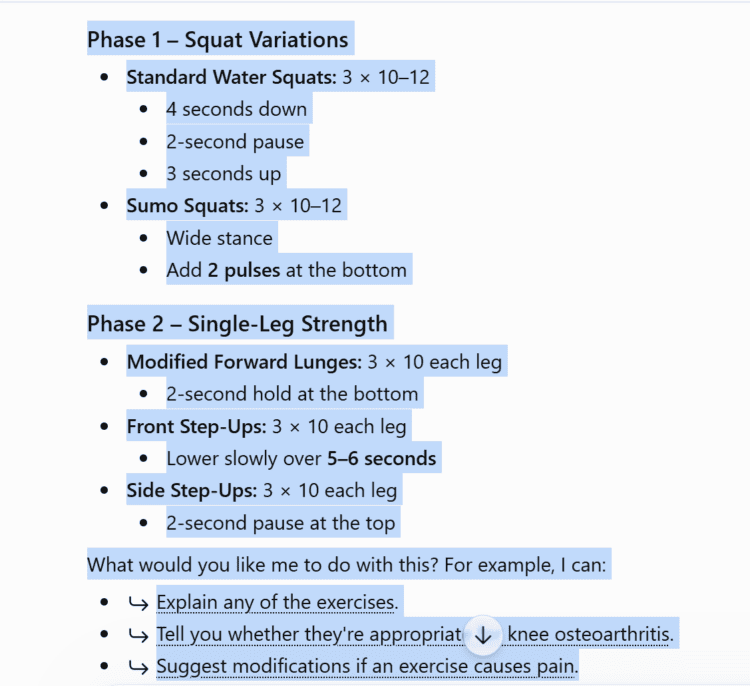
I turned to ChatGPT. “Give me a workout program for aquatic therapy to strengthen my knee.” It did, and I began using that program. Several weeks later, I asked our physical therapist to evaluate that routine and she said, “It looks great! I’ll just add a couple more exercises for you.”
The most helpful interactions with any AI chatbot — Grok, Claude, ChatGPT, Gemini, Perplexity, and others — begin with a prompt. Let’s take a look at prompts specific to prepping, which you can begin using right away.
Prompts for Assembling and Maintaining an Emergency Kit
Survival and prepping advice online tends towards the individual and household that is more rural, already has a preparedness background (LDS families, for example), and not so much for everyday moms with kids running around.
In fact, when I first began prepping and wanted to put together a family bug out bag, I found an online checklist written by a guy named “Old-Time Prepper” and followed his instructions to the letter! Years later, not a single thing he told me to buy was ever used!
Try putting AI to work so you end up with an emergency kit/bug out bag that’s exactly what you need.
Open a tab with your choice of AI chatbot and type in one of these prompts:
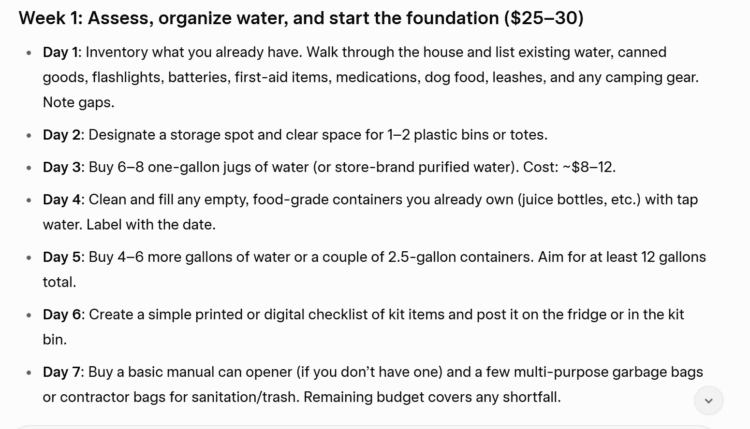
“I live in [your region] with [number] people in my household, including [ages/any special needs]. Walk me through a 30-day plan to build a basic emergency kit, one small task per day, assuming I can spend $25-30 a week.”
I asked Grok this question for my own family, and here’s part of its response:
Here’s a second prompt to get a list of any gear or supplies you may have overlooked:
“I already have these supplies: [list what you have]. What am I missing for a household of [size] to get through a week without power?”
Whichever you choose, I promise you’ll end up with something far more useful than that of Old-Time Prepper, or guys like him!
Prompts To Help Plan for Specific Scenarios
This is where AI can help you create a practical plan for your family in any set of circumstances because it can instantly analyze an event, say a hurricane, access thousands of pieces of information about past storms, how people were and were not prepared, typical emergency response times, and then combine knowledge that with your own set of specific circumstances. What you get is an in-depth plan, checklist, decision tree, spreadsheet — whatever format makes most sense to you (just ask for the format you want) — that you can immediately act on.
We live in Hurricane Country, so I’ve asked ChatGPT to give me a plan for getting ready for the storm and then what to do as it gets closer to landfall:
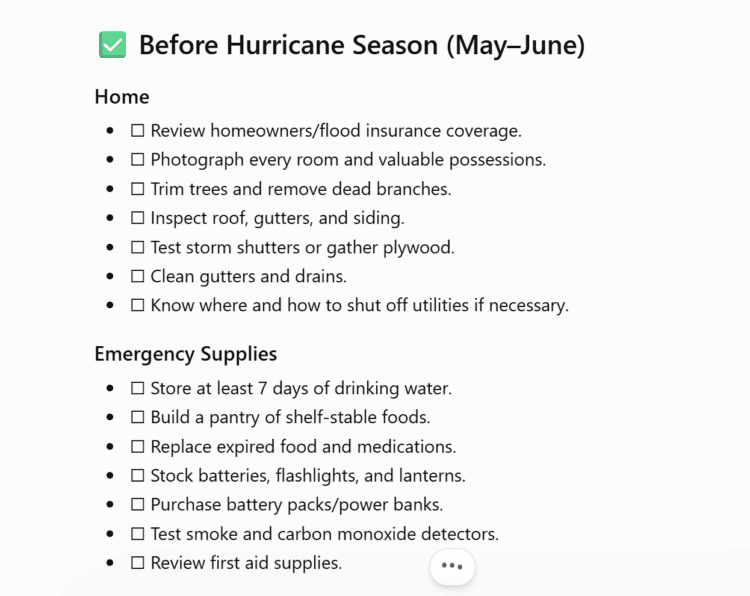
Pop in your general location, family size, health/mobility issues, any other concerns related to the crisis, and what you’ll get in return will be specific to your family, finances, and home.
Try these:
“I live in [your region] and tornadoes are a real concern where I am. Walk me through what an actual tornado safety plan should include for a house with [describe your home — basement, no basement, mobile home, etc.] and a household of [size]. Include what to do if I only have a few minutes of warning.”
“Walk me through what the first 24 hours after [specific scenario: a hurricane, a week-long power outage, a boil-water notice, etc.] would actually look like for a household like mine. What decisions would I need to make, and in what order?”
“I have [amount] saved for emergency prep this year. Help me prioritize spending across food, water, power, and medical, in order of what would actually save me the most trouble.”